How To Create an FTP Account on HostGator Hosting – cPanel Web-Hosting

HostGator is a recommended shared hosting for WordPress. In the recent times, we have covered few articles for HostGator hosting that would let you make most out of your account. If you have missed it, here are they: Extending this series, today I will show you how to create an FTP account on your HostGator hosting. When we hire a designer/developer for working on your site, most of us make the mistake of sharing the cPanel login details & it’s not a good security practice. It’s a good idea to create an additional FTP account & share it with them. For a desktop based FTP client, simply use FileZilla. It’s available for all platforms (Windows, Linux & Mac). Bonus Tip: For personal use, you can use your cPanel login details in your FTP client to access your web server FTP. Just ensure you add your primary domain address in the host field.

This is part of our know your web hosting series. HostGator is a recommended shared hosting for WordPress. In the recent times, we have covered few articles for HostGator hosting that would let you make most out of your account. If you have missed it, here are they:


Extending this series, today I will show you how to create an FTP account on your HostGator hosting. When we hire a designer/developer for working on your site, most of us make the mistake of sharing the cPanel login details & it’s not a good security practice.

It’s a good idea to create an additional FTP account & share it with them.  For a desktop based FTP client, simply use FileZilla. It’s available for all platforms (Windows, Linux & Mac).
Bonus Tip: For personal use, you can use your cPanel login details in your FTP client to access your web server FTP. Just ensure you add your primary domain address in the host field.

How to create a new FTP Account on HostGator hosting:

  • Login to your HostGator hosting cPanel
  • Click on FTP Accounts under Files tab

On the next page, you can start creating new FTP accounts. On the same page, you can also see all existing FTP accounts.
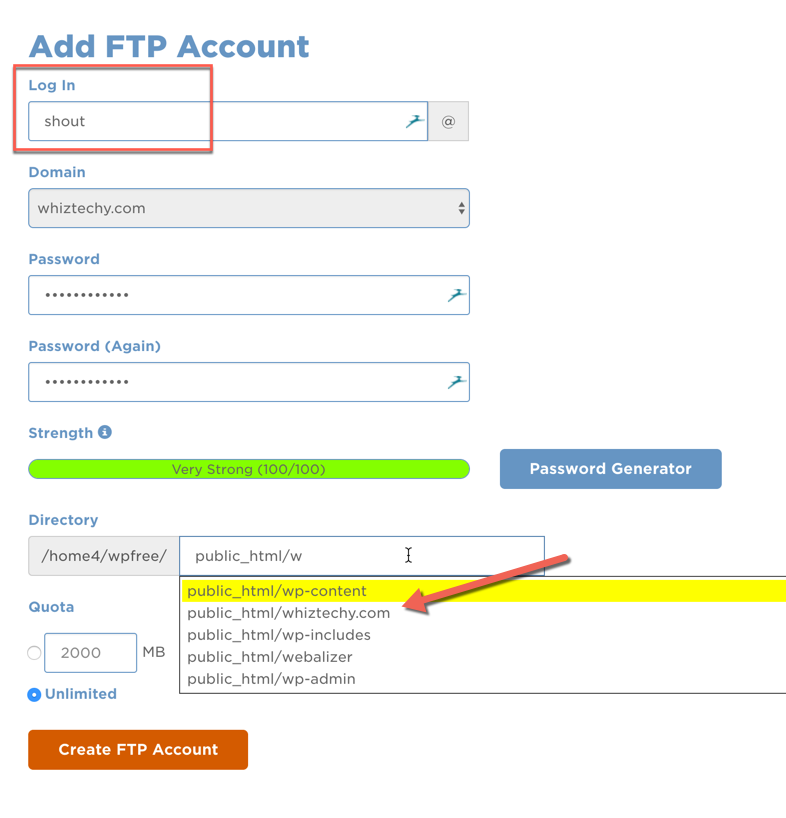
Use the password generator to create an automatic strong password for your FTP login. Make sure you cop the password locally.
The most important thing when creating an FTP account on cPanel hosting like HostGator, Bluehost or SiteGround is the directory location.
By default your root domain directory (Primary domain with Hostgator) location is public_html, however when you add an addon domain to your hosting that gets a dedicated directory of its own.
In the above example, for Whiztechy.com which is an addon domain, the home directory location is /public_html/whiztechy.com
If you are creating FTP account for your main domain, you need to just keep public_html & if you are creating account for your addon domain, simply select public_html/domainname.com
It’s a good time for you to refer to how to add addon domain to HostGator & see the option that says Document root to grasp the above fundamental clearly.
Click on create FTP account & your account will be created manually.  Nw, scroll down & you will see your newly created FTP account. From here, all you need to do is, click on configure FTP client & download the FTP Configuration Guide. (I use FileZilla which is free & recommend the same for you).

Clicking on FTP Configuration file will download a file & now open FileZilla app on your system. Click on File > Import & browse the downloaded configuration file.

This will add the configuration in your Filezilla site manager.  Now click on Site manager (See below screenshot), you will see your FTP configuration & click on connect.

Enter your password & you would see a prompt,  click on yes & now you should be logged in to your Hostgator hosting account via FTP. You can always share the configuration file + password with your designer/developer for connecting to your hosting account via FTP.
For the first timer this kind of things look tough, but once you have done it, you would be amazed that how easy & non-technical this was. The steps that I listed above is same for almost all hosting that offers cPanel. It will work on following hosting companies:
  1. Hostgator
  2. BlueHost
  3. SiteGround
  4. InMotionhosting
If you have never done this & you are on HostGator or any of the above hosting companies, go ahead & try this. Now only you will learn something new; this will help you save a lot of headache in future.
If you want to add another tip regarding FTP account on HostGator or another cPanel hosting, do share with us in the comment section below. If you find this tutorial helpful, do share with your friends on Facebook & Twitter.
Name

A9,2,Accelerated Mobile Pages Project,2,Adsense guide,8,adsense trick,3,Advertisement,5,Affiliate,3,Affiliate marketing,10,airtel trick for blocked sim,1,Algorithm,2,Algorithm Update,2,ama,1,Amazon,24,Amazon A to Z guarantee claims,1,Amazon affiliate program,2,Amazon FBA,3,Amazon guide,27,Amazon Launchpad,2,Amazon merch,7,Amazon niche,14,Amazon optimization,9,Amazon sale,22,Amazon seo,18,AMP,2,android,1,android apps,1,Autopilot,1,backlink,3,Bing,1,Bitcoin Exchange,2,Bitcoin Guide,3,Bitcoin Wallets,1,Blogger,3,Blogging guide,47,Blogging tips,31,blogging trick,23,Blogspot,4,Boost sale,3,Business,2,Buy and Sell Bitcoins,2,buy youtube subscribers,1,cheap youtube views,1,cheapest wordpress hosting,2,Chrome,1,Clinton,1,Cloud storage trick,1,Content Marketing,2,Content Marketing Strategy,3,cPanel,1,CPC,2,CPC Strategy,2,CPM,1,Digital Marketing,9,Domain Authority,1,Dreamhost,1,e-commerce,1,earn in dollars,1,earn unlimited money,1,Ecommerce,28,edit pdf file online,1,edit pdf files,1,Effective Instructor Online,1,Email Marketing,5,Email Subscription,1,Email Subscription Plugins,1,Entrepreneurship,1,Extensions,1,Facebook Marketing,3,Fred,2,free youtube subscribers,1,Freelance Clients,2,FTP,1,Get FreSocial Traffice,1,Godaddy Affiliate Program,1,Google,6,Google Algorithm Update,2,Google Ranking Factors,6,Google Trends,1,Google Updates,2,Guest Posts,4,Hillary Clinton,1,Hostgator,2,hosting,6,how to,44,how to edit pdf files,1,how to get more subscribers on youtube,2,How to make money online,19,how to share pdf files online,1,Keyword,6,Keyword Research Tools,1,link building,3,Link Resolutions,1,Long tail keywords,6,Magento,1,mark,1,Marketing,6,Marketing Strategy,1,Marketplace,6,Mcommerce,1,Merch,2,Merch seo,3,Mobile Audiences,1,Mobile commerce,1,Mobile Development Platform,2,monetize,1,Money making guide,15,most subscribed youtube channels,1,Niche,8,Online Security,1,Optimization,3,Organic traffic,1,Other,4,Paid traffic,1,paypal,1,pdf file sharing,1,PHP,1,Plugins,2,Premium Discount Codes,1,Promotions,1,Referral Program,1,researched keywords,8,Rich Snippets,1,Search Engine Optimization,15,SEM,1,SEO,43,SERP,14,SERPs,20,share pdf files,1,share pdf files online,1,Shopify,3,Shopify and Amazon,2,Shopify and Amazon Guide,2,Shopify Guide,3,Shopify niche,2,Shopify seo,2,Small Business,1,SmartBribe,1,Smartphone Apps,1,SMO,1,Social Media & Marketing,7,Social Traffic,3,Technology,1,Tool,1,Traffic,1,Trending,1,Trump,1,Tumblr,1,Twitter,1,Typepad,1,Virtual Assistant,1,Voice Searches,1,Web commerce,1,Webmaster,1,Website,2,Wordpress,5,Wordpress guide,16,wordpress hosting india,2,WordPress Real Estate Websites,1,youtube,3,youtube subscribers,2,youtube views,1,
ltr
item
SEO TRICKS BLOG: How To Create an FTP Account on HostGator Hosting – cPanel Web-Hosting
How To Create an FTP Account on HostGator Hosting – cPanel Web-Hosting
HostGator is a recommended shared hosting for WordPress. In the recent times, we have covered few articles for HostGator hosting that would let you make most out of your account. If you have missed it, here are they: Extending this series, today I will show you how to create an FTP account on your HostGator hosting. When we hire a designer/developer for working on your site, most of us make the mistake of sharing the cPanel login details & it’s not a good security practice. It’s a good idea to create an additional FTP account & share it with them. For a desktop based FTP client, simply use FileZilla. It’s available for all platforms (Windows, Linux & Mac). Bonus Tip: For personal use, you can use your cPanel login details in your FTP client to access your web server FTP. Just ensure you add your primary domain address in the host field.
https://www.shoutmeloud.com/wp-content/uploads/2016/12/FTP-Accounts-cPanel.png
SEO TRICKS BLOG
https://trickess.blogspot.com/2016/12/how-to-create-ftp-account-on-hostgator.html
https://trickess.blogspot.com/
http://trickess.blogspot.com/
http://trickess.blogspot.com/2016/12/how-to-create-ftp-account-on-hostgator.html
true
696915773859546959
UTF-8
Loaded All Posts Not found any posts VIEW ALL Readmore Reply Cancel reply Delete By Home PAGES POSTS View All RECOMMENDED FOR YOU LABEL ARCHIVE SEARCH ALL POSTS Not found any post match with your request Back Home Sunday Monday Tuesday Wednesday Thursday Friday Saturday Sun Mon Tue Wed Thu Fri Sat January February March April May June July August September October November December Jan Feb Mar Apr May Jun Jul Aug Sep Oct Nov Dec just now 1 minute ago $$1$$ minutes ago 1 hour ago $$1$$ hours ago Yesterday $$1$$ days ago $$1$$ weeks ago more than 5 weeks ago Followers Follow THIS CONTENT IS PREMIUM Please share to unlock Copy All Code Select All Code All codes were copied to your clipboard Can not copy the codes / texts, please press [CTRL]+[C] (or CMD+C with Mac) to copy